REST Authentication
Mint a vcp:read API key and call /api/v1/vcp/sites/* with the X-API-Key header.
Send your API key in the X-API-Key header on every call to https://api.voke.turena.cz/api/v1/vcp/sites/*. That header is the only thing the REST API authenticates against.
For scopes, hashing, AMQP usage, and rotation, see API keys & auth.
Prerequisites
- An ORG_ADMIN account on the target organisation.
- A REST client able to set custom request headers — curl, HTTPie, Postman, or your own SDK.
Step 1 — Open the Connections page
Sign in to https://voke.turena.cz, pick the right organisation, and open Workspace settings → Connections (/orgs/<orgId>/settings/connections).
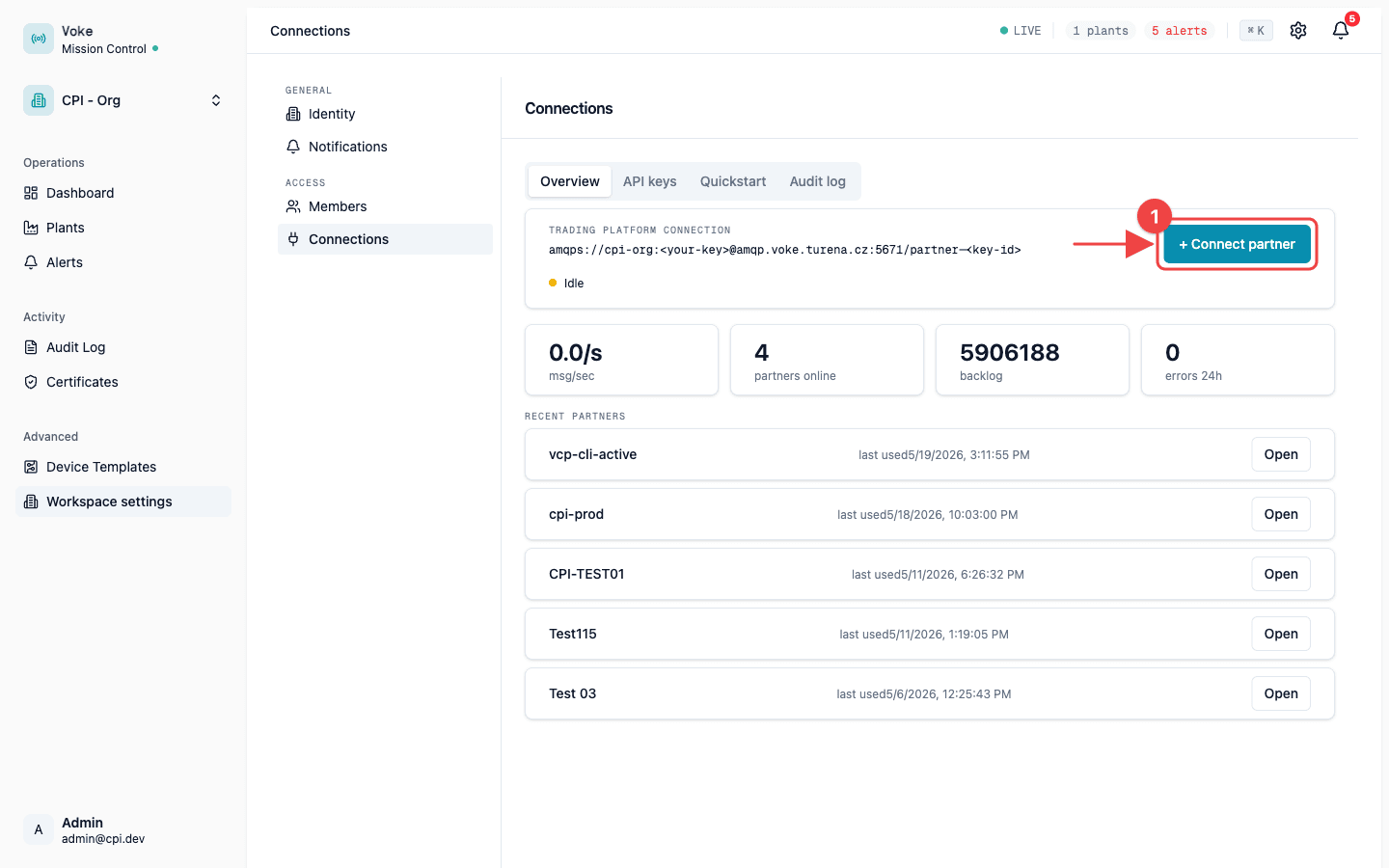
Click + Connect partner to open the wizard.
Step 2 — Pick a preset
The wizard offers five presets. Any preset that includes vcp:read lets you call the REST API — pick the one that matches what you're integrating.
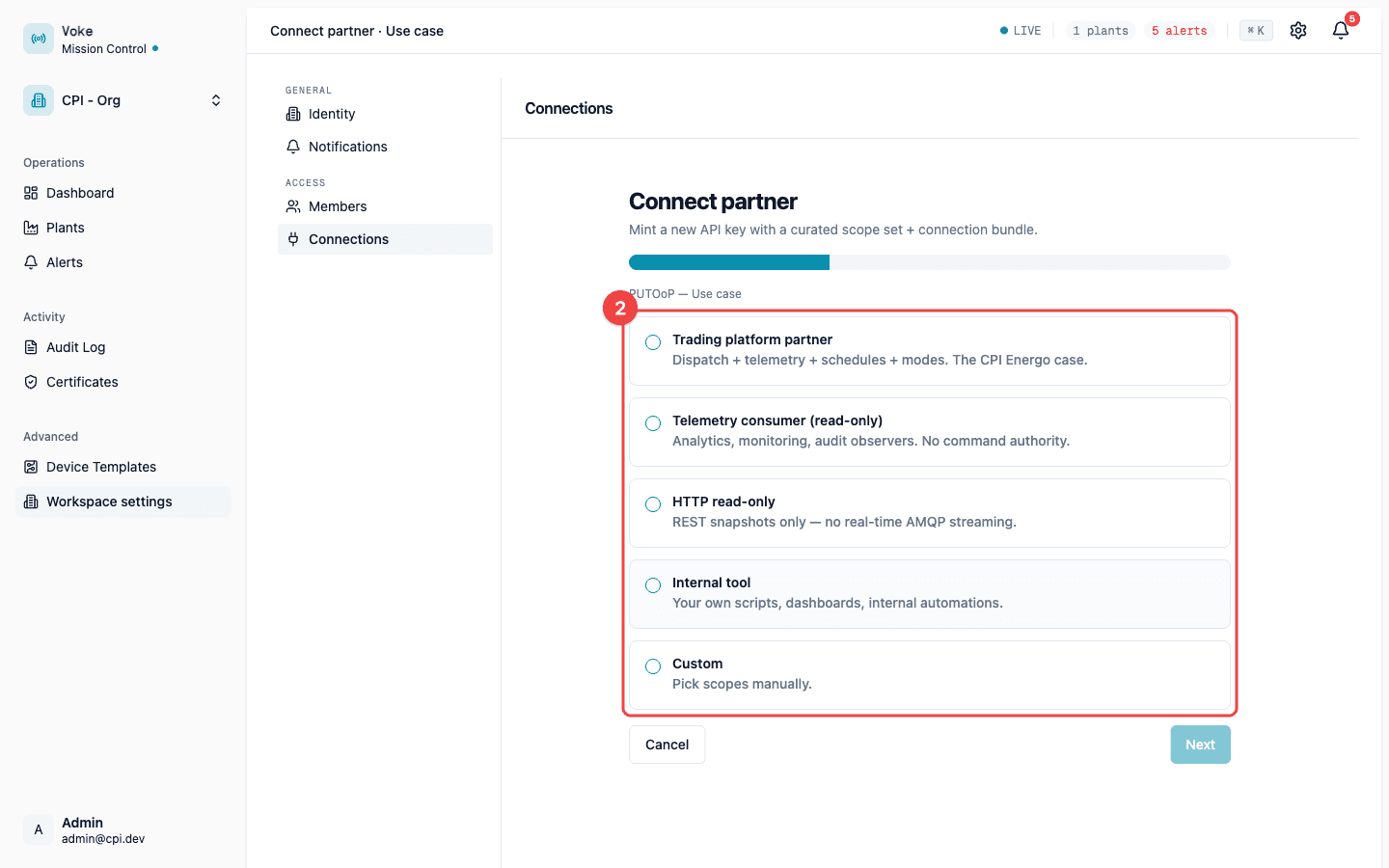
| Preset | Best for | REST access |
|---|---|---|
| Trading platform partner | Full ESM integration: dispatch commands, consume telemetry, push schedules and modes. | Yes (full vcp:* set) |
| Telemetry consumer (read-only) | Analytics or monitoring services that consume the live AMQP telemetry stream and also need REST snapshots. | Yes |
| HTTP read-only | Dashboards, reports, and scripts that only need REST. REST snapshots only — no AMQP connect scope. | Yes (only scope on the key) |
| Internal tool | In-house scripts against the non-VCP admin REST endpoints. | No |
| Custom | Pick scopes manually. | Optional |
Step 3 — Confirm vcp:read is checked
REST endpoints require the vcp:read scope. Trading platform partner, Telemetry consumer, and HTTP read-only all pre-check it; the other presets don't. Make sure it's checked before continuing. Other scopes don't affect REST — leave them however your preset configured them.
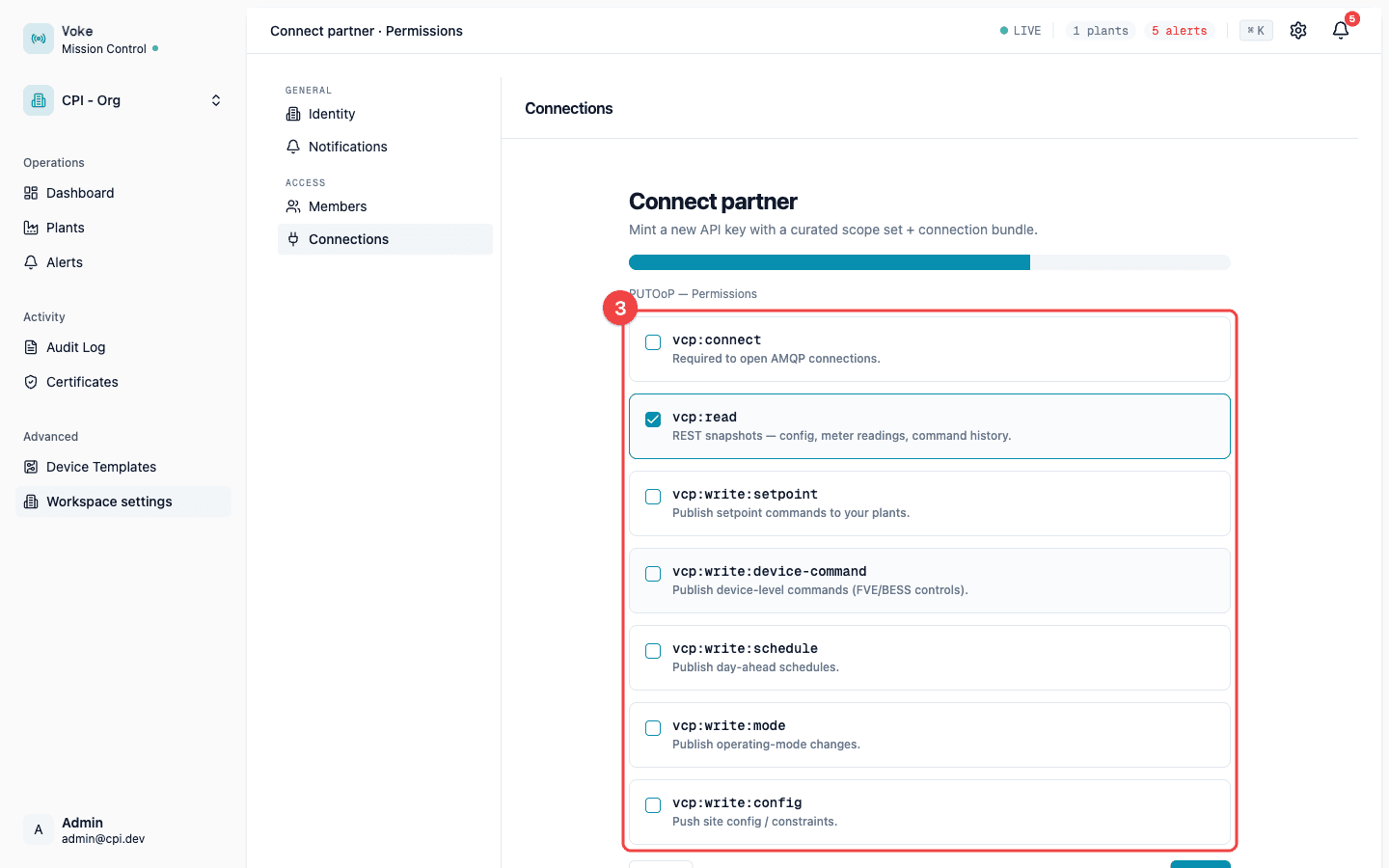
| Scope | What it grants |
|---|---|
vcp:connect | Open an AMQP connection. Not needed for REST. |
vcp:read | Every endpoint under /api/v1/vcp/sites/* — site list, site config, telemetry, meter readings, schedules, command history. |
vcp:write:setpoint | Publish setpoint commands over AMQP. |
vcp:write:device-command | Publish device-level commands over AMQP. |
vcp:write:schedule | Publish day-ahead schedules over AMQP. |
vcp:write:mode | Publish operating-mode changes over AMQP. |
vcp:write:config | Push site config over AMQP. |
Step 4 — Name the key and generate
Give the key a name you'll recognise later and a partner ID. If your service has a stable egress IP, add it to the allowlist. Voke then rejects calls from any other address.
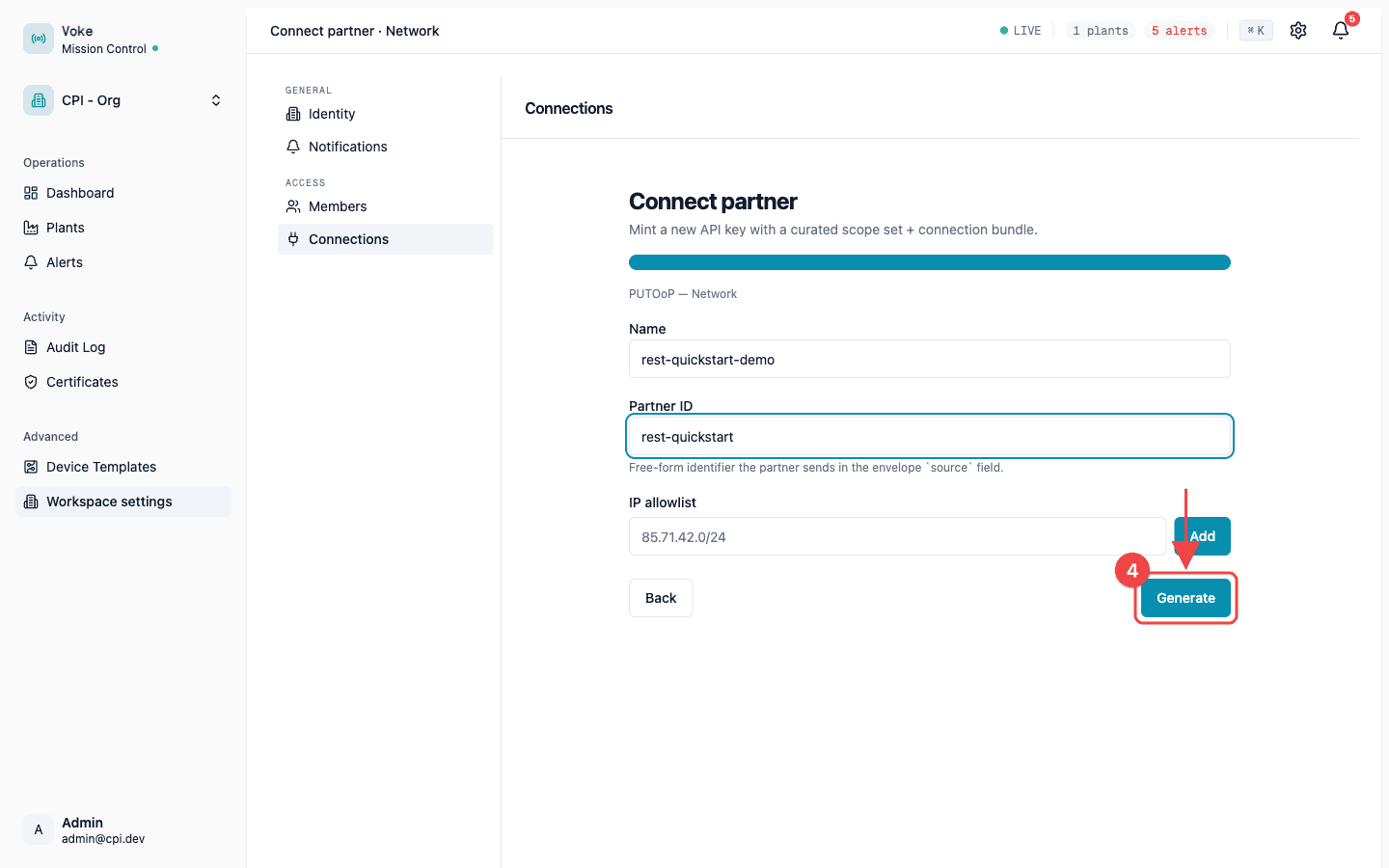
Click Generate. Voke shows the plaintext key once on the next screen.
The key is shown exactly once. Copy it into your secret manager before leaving the reveal screen. If you lose it, mint a new key with the same scopes and revoke the old one.
Step 5 — Send your first authenticated request
Set the key as X-API-Key and call any /vcp/sites/* endpoint. The REST base URL is https://api.voke.turena.cz/api/v1/vcp/sites.
The Quickstart tab on the Connections page pre-fills these snippets with your org slug. Replace <your-key> with the value from the reveal screen.
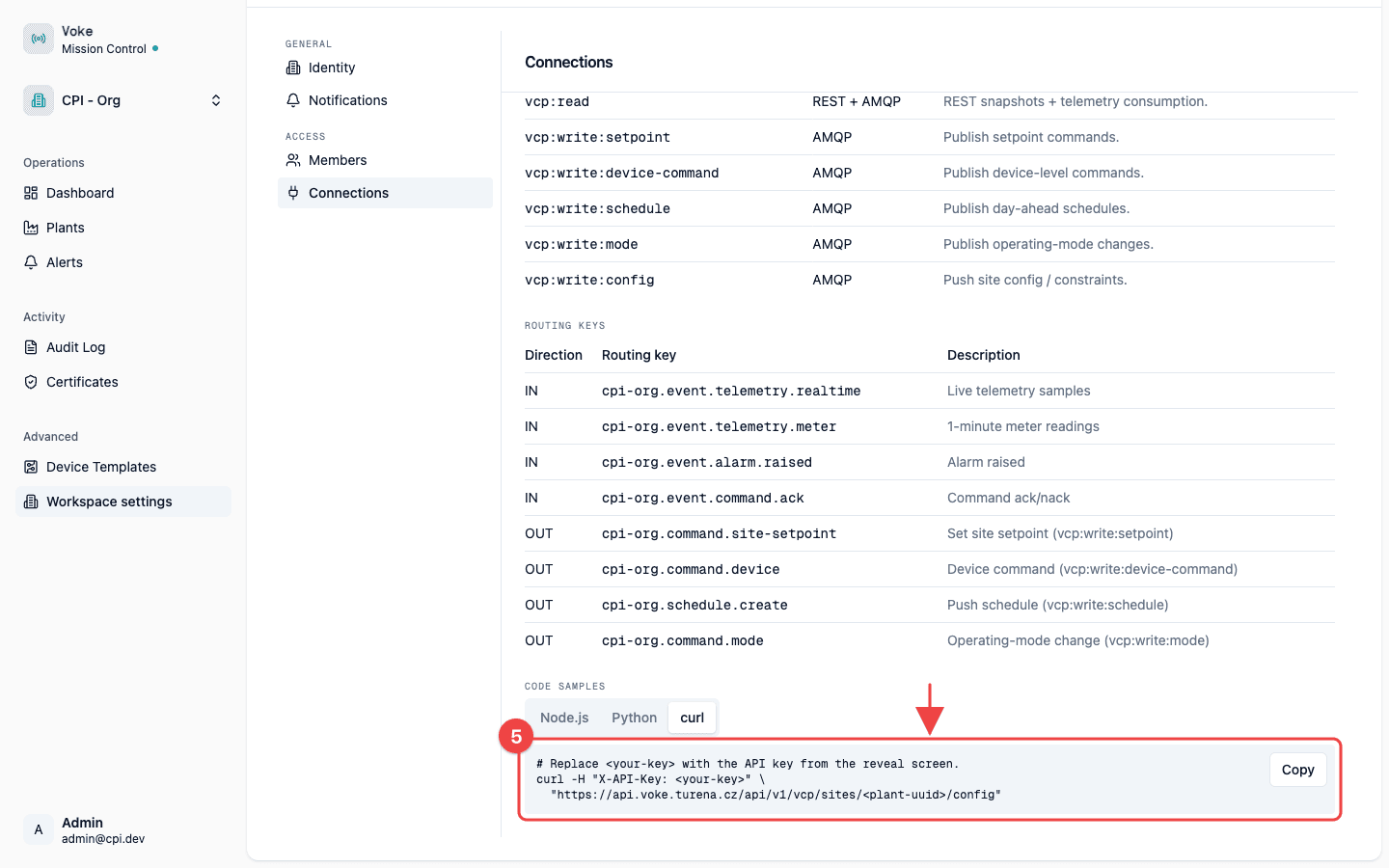
curl -H "X-API-Key: voke_a1b2c3..." \
  "https://api.voke.turena.cz/api/v1/vcp/sites/<plant-uuid>/config"
const res = await fetch(
`https://api.voke.turena.cz/api/v1/vcp/sites/${plantUuid}/config`,
{ headers: { 'X-API-Key': process.env.VOKE_API_KEY! } },
);
if (!res.ok) throw new Error(`Voke REST ${res.status}: ${await res.text()}`);
const config = await res.json();A successful call returns the site config envelope:
{
  "siteId": "00000000-0000-4000-a000-000000000123",
  "constraints": {/* ... */},
  "fallback": {/* ... */},
  "operatingMode": "...",
  "modeOverride": null,
  "activeSchedule": null,
  "pendingCommands": [/* ... */]
}
Errors
| Status | code | Cause |
|---|---|---|
401 Unauthorized | UNAUTHORIZED | X-API-Key header missing, or the key was revoked, expired, or unknown. A signed-in admin browser session does not count — only the header authenticates REST calls. |
401 Unauthorized | UNAUTHORIZED | Caller IP is outside the configured allowlist (message IP not allowed). |
403 Forbidden | FORBIDDEN | The key authenticated but lacks vcp:read. Re-mint with the right scope. |
404 Not Found | SITE_NOT_FOUND | The site UUID belongs to a different org. Voke returns 404 (not 403) so existence is never leaked. |
See Errors & retries for the full error envelope and retry semantics.
Next steps
- REST Reference — interactive Scalar reference for every
/vcp/sites/*endpoint. - API keys & auth — rotation, revocation, storage model, and the
ApiKeyScopeenum. - Errors & retries — error envelope, idempotency, and backoff.